Run a supply route from a mining outpost to your station
A supply route has two jobs. The docks move cargo between ship and station. The ship's autopilot picks a dock and decides when to leave. Start with one material and two named docks so you can tell whether a missed delivery comes from the schedule or the transfer.
Prepare a Silica pickup and a receiving dock
At the mining outpost, run the Silica supply into the dock's loading port. At home, configure the port on the station side to unload Silica and belt its output into a box with room. Give the docks distinct names such as Silica Pickup and Home Unload. Choose a fueled ship with free cargo space. If you're visiting the outpost in a second ship, clear the pickup dock before starting the hauler.
Try each dock with a piloted ship. At pickup, look for Silica entering the hold. At home, check that the same stack shrinks while Silica appears in the box. Surtr Plays demonstrated this dock-by-dock test in the January 2026 playtest and later configured both receiving ports for Silica in Early Access. Playtest loading and unloading test · Early Access receiving dock
Give the ship two destinations
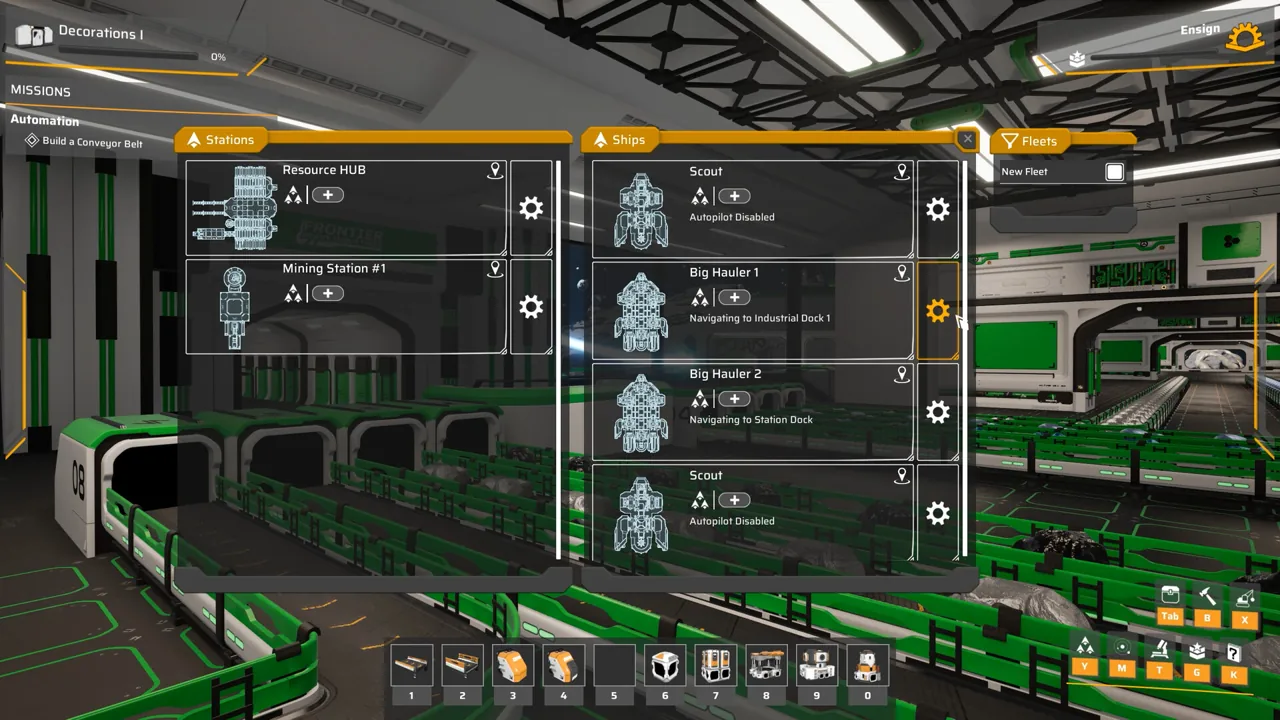
- Select the hauler in the ship list, open its autopilot settings, and add the pickup dock as the first destination. Set Wait for items to Silica and choose a quantity the ship can carry and the outpost can supply. For a first test, use a batch that's already waiting.
- Add the home unloading dock as the next destination. Set the ship to wait until its Silica has unloaded. Reopen each stop and check its condition before switching autopilot on. A pickup condition copied to the unloading stop can make the ship wait for cargo that is leaving it.
- Follow the ship on the map. In the launch run, Surtr Plays set pickup to at least 400 Silica, watched loading finish, then saw the ship fly home, dock, and begin unloading. For your route, keep watching until the receiving box gains Silica and the ship returns for another pickup. The player's corrected stop conditions · First delivery at the home dock
Read a stalled delivery from the ship's cargo
- The ship waits at pickup with a partial load. Compare its Silica count with the departure target, the space left in the hold, and the ore still arriving at the dock. If the target exceeds what will fit, lower it or free cargo space. If the hold is empty, repeat the manual loading test.
- The ship reaches home but keeps the load. Watch whether it actually docks. If it keeps approaching, clear the berth and check the approach using the ship docking guide. If it docks and the Silica count stays high, follow the selected port's belt to storage with the cargo unloading guide.
- The next material goes to the wrong place. Check the unloading filter on each connected port and where its belt leads. Test the second material with a small stack before raising either pickup target.
Add a refueling stop
Give a separate dock a supply of Hydrogen Fuel and add it after the unloading stop. In the launch example, the player enabled the ship Reactor's automatic fuel insertion and chose a departure condition of at least 20 Hydrogen Fuel. With auto-insert on, fuel can go straight to the Reactor before it accumulates in cargo. Compare both inventories if the dock's belt is moving but the ship is still waiting. The 20 is a departure threshold for that ship, so allow room for it when planning the next ore load. Refueling dock and Reactor setup · How the player checked the fuel condition